How Can We Help You
Frequently Asked Questions
Using a monitor arm offers several practical advantages over a traditional monitor stand:
- • Improved Ergonomics -Adjust your screen to eye level to reduce neck and shoulder strain.
- • Greater Flexibility -Tilt, swivel, rotate, or move your monitor freely to match your workflow.
- • Cleaner Workspace -Free up valuable desk space and hide cables for a neater look.
- • Enhanced Productivity - Set up dual monitors or a customized layout to improve multitasking.
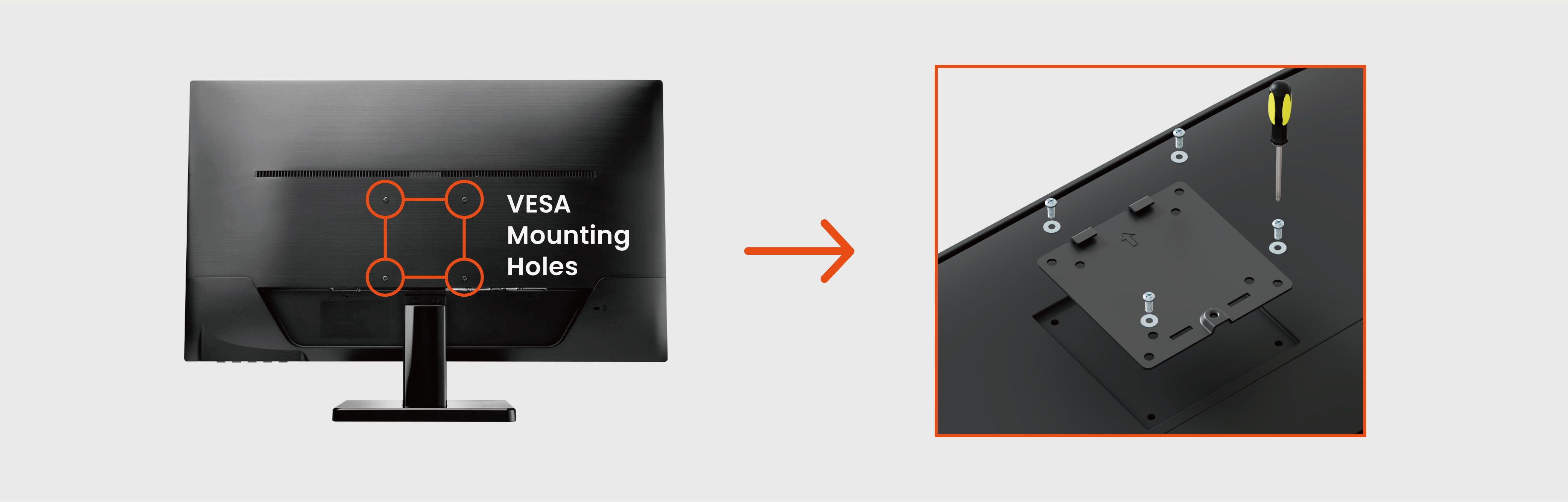
- • Check the VESA pattern on the back of your monitor to make sure it matches the arm's supported mounting standards.
- • Check the weight of your monitor and ensure it falls within the weight capacity.
-
• Check the screen size to confirm that the monitor mount is designed to support your monitor's dimensions.
(Screen size is not a strict requirement if the above two conditions are met; however, larger screens may limit the available height adjustment range.
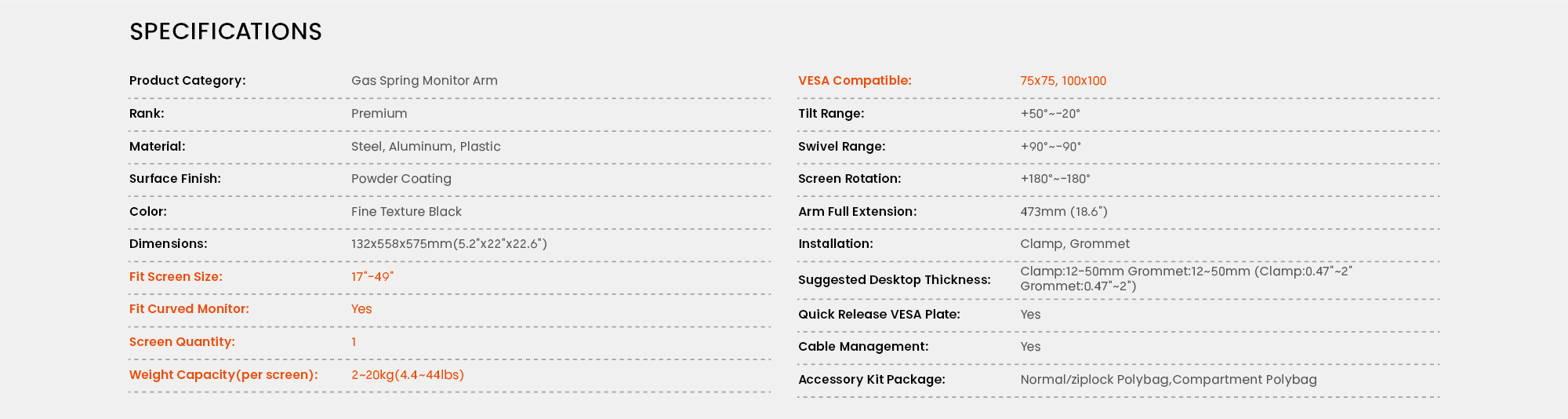
VESA (Video Electronics Standards Association) standard specifies the hole patterns on the back of monitors. The most common VESA hole patterns are 75x75mm and 100x100mm, although larger monitors may have different hole patterns. The VESA plates of Brateck monitor mounts are designed using standard VESA hole patterns that fit most monitors. If the monitor doesn't happen to have a standard VESA pattern, we also offer non-VESA brackets that can be used to adapt the monitor to fit a standard sized VESA plate.
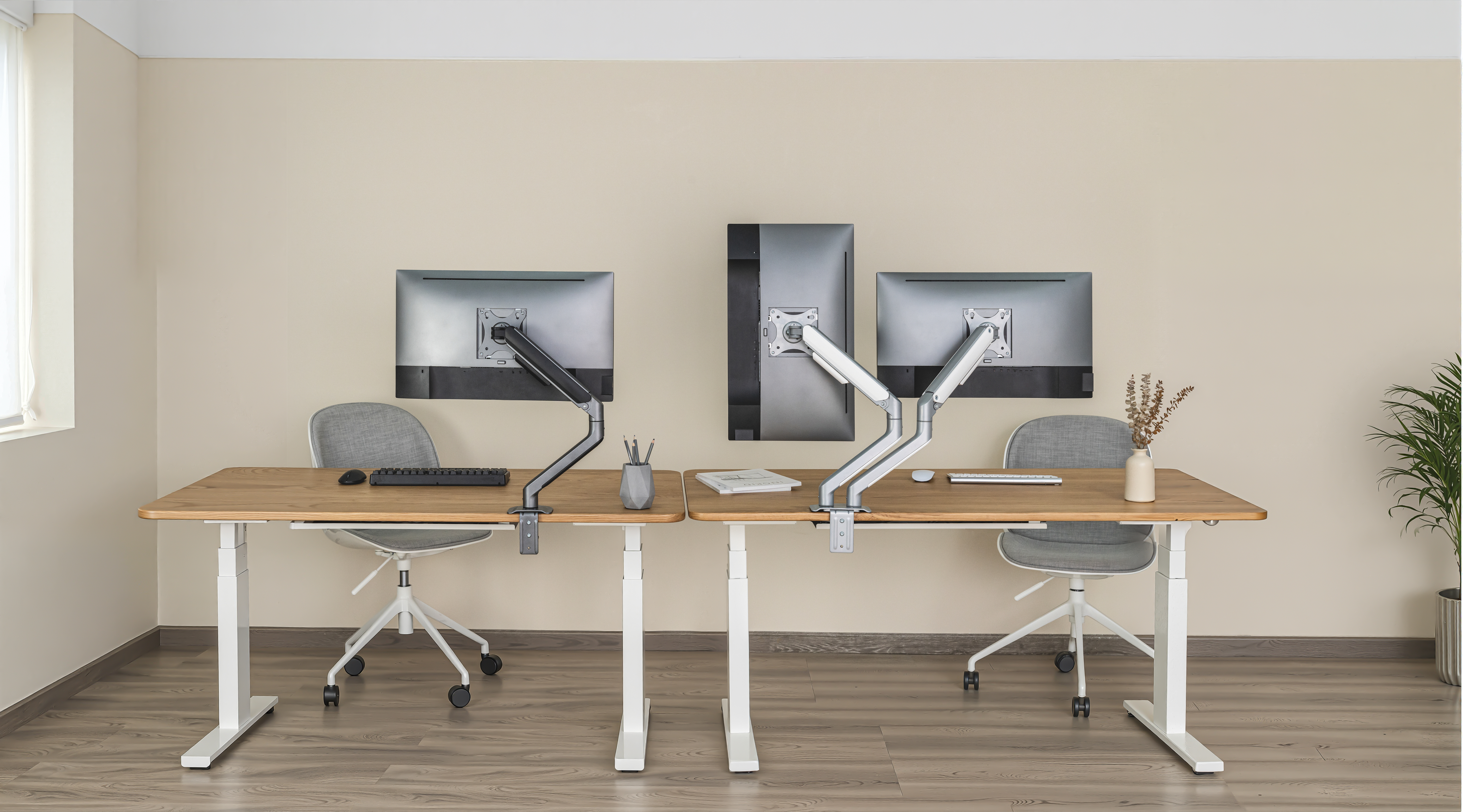
- • Single Monitor Mount: Ideal for minimal setups, focused tasks, or limited desk space.
- • Dual Monitor Mount: Supports two monitors side by side, ideal for multitasking professionals.
Our monitor mounts typically include a clamp or grommet mount, and some models offer both installation options for added flexibility. A freestanding mount is also available and provides the easiest installation for almost any desk.
- • Standard Clamp Mount: Easy to install and remove without drilling, ideal for desks with accessible edges.
- • Topside Clamp Mount: Effortless installation from above the desk surface-no need to crawl under the desk.
- • Grommet Mount: Provides a cleaner, more permanent setup by securing through a desk hole.
- • Freestanding Mount: Set the monitor on any flat surface and easy to move.

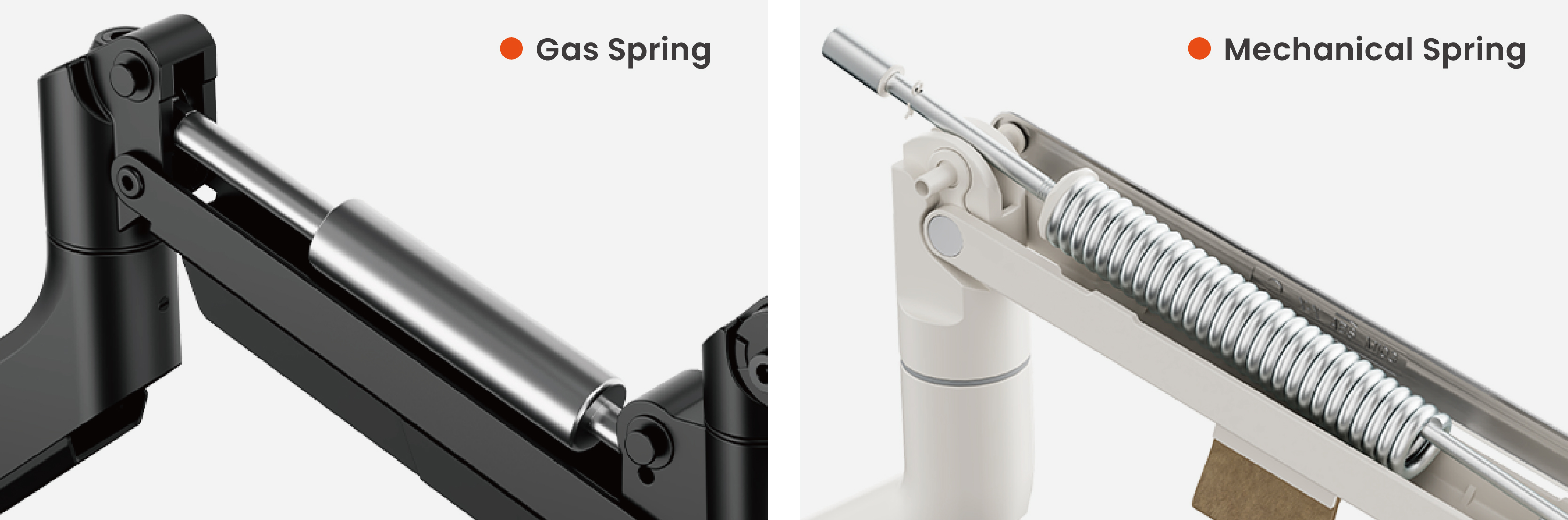
- • Gas-Spring Mounts: Use internal pressure for effortless movement, ideal for frequent adjustments.
- • Mechanical Spring Mounts: Rely on friction or spring tension, often more budget-friendly while still providing smooth movement.
Yes, as long as the monitor is within the weight and size limits. Look for heavy-duty mounts or models designed specifically for ultrawide screens.
Most monitor mounts can be mounted on desks with:
- • A solid surface (wood, metal, etc.).
- • A thickness of 0.4" to 3"(depending on the clamp model).
- • A stable edge for clamp mounting, or a grommet hole for center mounting.
Avoid using monitor mounts on glass desks unless you use a proper reinforcement plate or have manufacturer assurance.
Yes, our quality monitor mounts are designed for regular adjustments.
- • Check Weight Limits: Make sure your monitor is within the mount's specified load range.
- • Monitor mount will move if the spring tension is not suitable. Firmly hold the upper arm horizontally as shown and position the arm. Adjust the tension screw using the supplied Allen Key as follows.
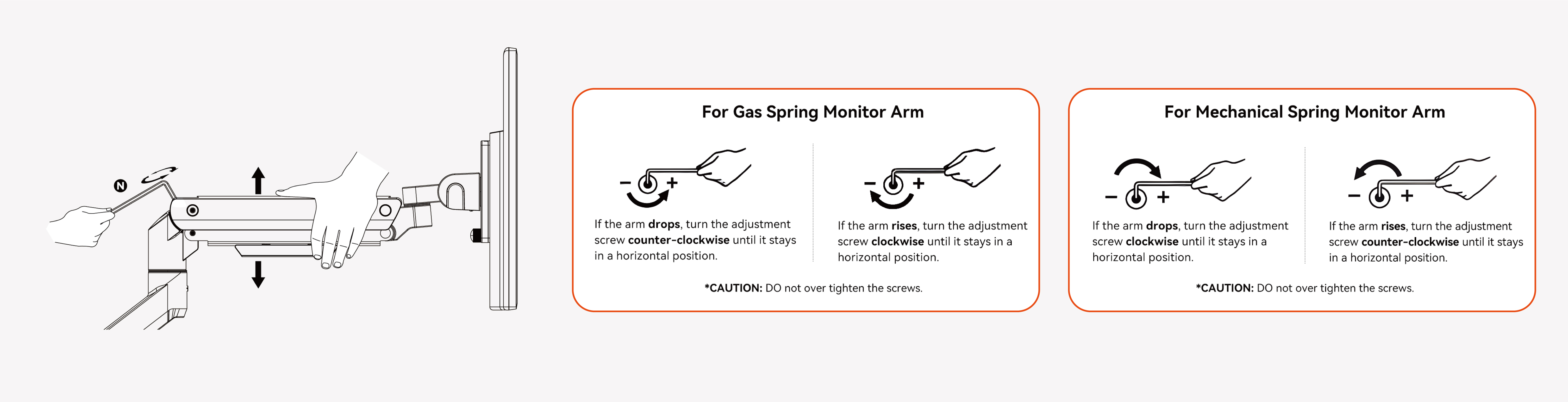
If you're unable to move the monitor mount smoothly, it may be due to over-tightened components.
- • DO NOT overtighten the tension screw for spring-assisted mounts, or you may difficult to up/down your screens.
- • Do NOT overtighten the screws on arm joints, or you may difficult to tilt or swivel your screens.
- • DO NOT overtighten the screws behind the VESA plate, or you may difficult to rotate your screens.
- • Make sure the monitor mount is securely fixed. If using a clamp mount, ensure it's tightly attached to the desk edge.
- • Check for any worn-out or damaged parts, such as joints or screws, and replace them if necessary.
- • If your monitor droops or tilts, it may indicate that the tension settings are too loose. Retighten the spring tension (as described in Q10) to increase the tension and support the weight of the monitor.
- • If the weight of the screen exceeds the load capacity of the monitor mount, causing the screen to tilt or droop, we recommend you to buy another mount which can bear the screen's weight.
- • Adjust the screws behind each VESA plate to fine-tune the height.
- • Reposition each monitor until both are aligned horizontally.
- • Ensure both monitor mounts have identical tension settings for consistent positioning.
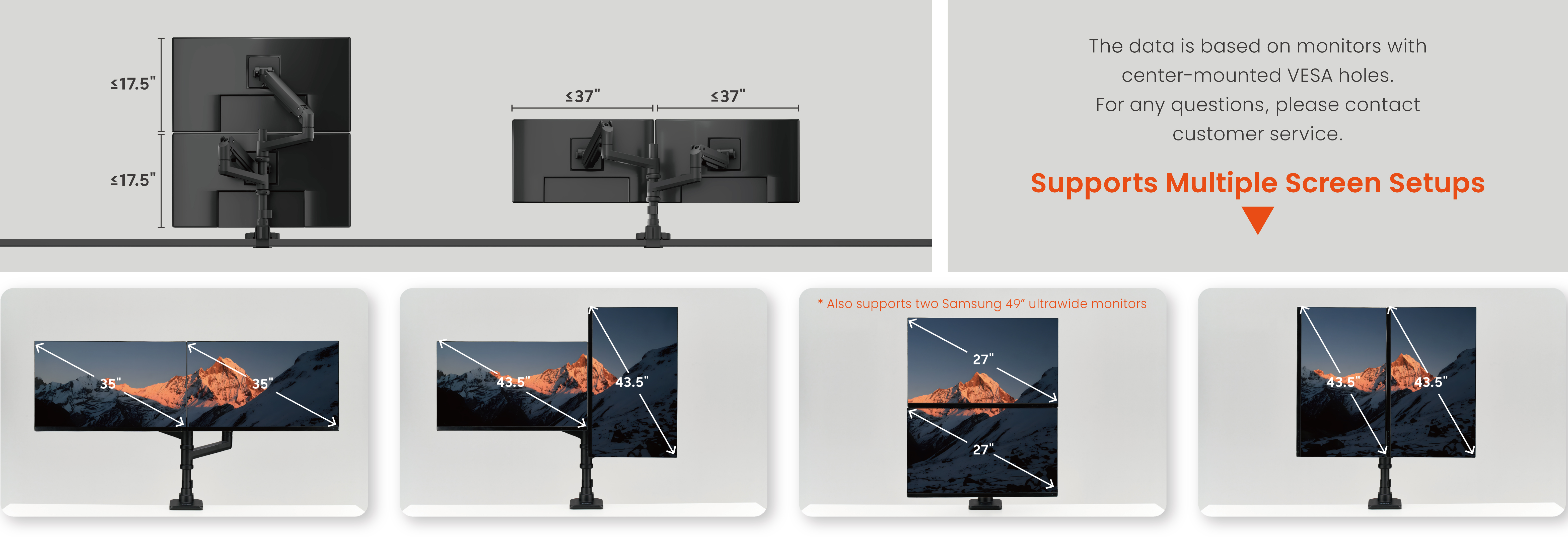
Yes, some of our monitor mounts (e.g., LDT69-C24P) allow vertical stacking of two monitors for enhanced productivity.
Yes. Most monitor mounts include built-in cable management to keep cables organized and reduce desk clutter.
Yes. Some monitor mounts can support laptops when paired with a compatible laptop tray (built-in or sold separately).
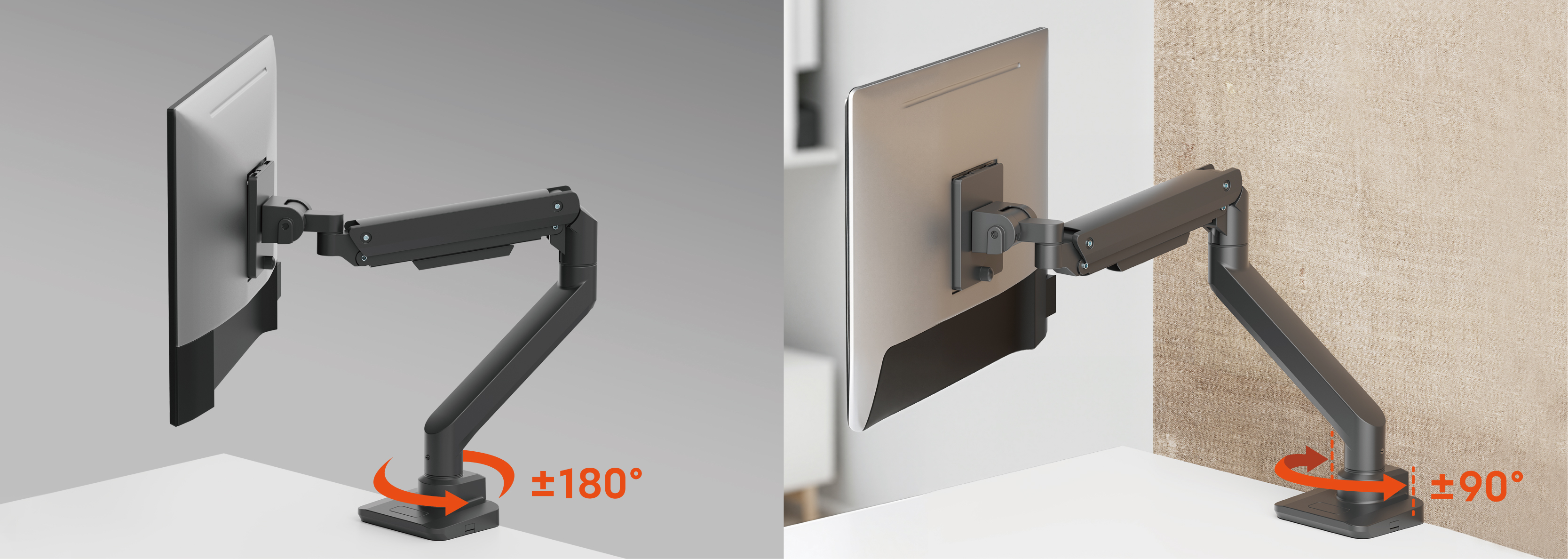
Rotation stop is a feature found in some monitor mounts that will prevent the mount from over-rotating and entering adjacent space or bumping into walls. It provides a user-selectable 180° or 360° rotation range that prevents the arm from movement beyond the back edge of the workspace or hitting adjacent partitions - perfect for dual-monitor mounting needs, desks near walkways and cubicles that have limited space.
A sit-stand desk allows users to alternate between sitting and standing, which help improve comfort and reduce the risks of prolonged sitting.
To choose the right standing desk, consider your workspace size, height requirements, how often you plan to switch positions, and your tech setup. Look for features such as a smooth electric lift, sufficient desktop space, and a reliable warranty. You can also refer to the product specifications for more details. Reputable brands like Brateck offer customizable options and ergonomic designs to enhance comfort and productivity.
The optimal desk height should encourage a natural, eased, and upright sitting or standing posture, keep shoulders, neck, legs, and feet relaxed, and maintain the spine in a neutral position. Your height is the most important one of the factors in determining a standing desk height. The chart below helps to calculate the proper standing desk height.
| Your Height | Sitting Desk Height | Standing Desk Height |
|---|---|---|
| 5'0"(152.4cm) | 22.5"(57.2cm) | 36.5"(92.7cm) |
| 51"(154.9cm) | 23"(58.4cm) | 37"(94.0cm) |
| 5'2"(157.5cm) | 23"(58.4cm) | 37.5"(95.2cm) |
| 5'3"(160.0cm) | 23.5"(59.7cm) | 38"(96.5cm) |
| 54"(162.6cm) | 24"(61.0cm) | 39"(99.1cm) |
| 55"(165.1cm) | 24.5"(62.2cm) | 39.5"(100.3cm) |
| 56"(167.6cm) | 25"(63.5cm) | 40.5"(102.9cm) |
| 5'7"(170.2cm) | 25"(63.5cm) | 41"(104.1cm) |
| 5"8"(172.7cm) | 25.5"(64.8cm) | 41.5"(105.4cm) |
| 5'9"(175.3cm) | 26"(66.0cm) | 42.5"(108.0cm) |
| 5'10"(177.8cm) | 26.5"(67.3cm) | 43"(109.2cm) |
| 511"(180.3cm) | 27"(68.6cm) | 43.5"(110.5cm) |
| 60"(182.9cm) | 27"(68.6cm) | 44"(111.8cm) |
| 6'1"(185.4cm) | 27.5"(69.8cm) | 44.5"(113.0cm) |
| 6'2"(188.0cm) | 28"(71.1cm) | 44.5"(113.0cm) |
| 63"(190.5cm) | 28.5"(72.4cm) | 46"(116.8cm) |
| 64"(193.0cm) | 28.5"(72.4cm) | 47"(119.4cm) |
| 65"(195.6cm) | 29"(73.7cm) | 47.5"(120.6cm) |
| 66"(198.1cm) | 29"(73.7cm) | 48"(121.9cm) |
| 6'7"(200.7cm) | 29.5"(74.9cm) | 49"(124.5cm) |
| 6"8"(203.2cm) | 30"(76.2cm) | 49.5"(125.7cm) |
Our standing desks available in both motorized and manual height adjustments.
- • Smart Electric Control: Available in touch mode and button mode. Designed with memory settings, the electric control is ever-intuitive to operate and fast to reach the desired position with a gentle press or touch. Built-in reminder helps build a good sitting-standing habit.
- • Foot-activated Pedal: Powered by gas springs, pneumatic standing desks are easy to move up or down fast and quietly by pressing a foot pedal.
The frame is compatible with a range of desktop sizes. Please check the product specifications for the recommended width and depth.
Yes. The motor is designed for smooth and quiet lifting, typically operating at a low noise level.
Yes. Our electric standing desks feature anti-collision protection, along with overload and thermal protection to ensure safe and reliable operation.
Please perform a system reset according to the instructions in the user manual. Lower the desk to the lowest position to recalibrate the lifting system and restore both legs to the same height.
Yes. Most standing desks can support monitor mounts, as long as the desk thickness and weight capacity meet the mount's requirements. Using a monitor mount with a standing desk also helps improve ergonomics, frees up valuable desk space, and allows flexible screen positioning for a more comfortable and efficient workspace.
A desk converter is a desktop device that sits on your existing desk and allows you to switch between sitting and standing. It raises your monitor and keyboard to an ergonomic height with a manual or electric lift system-ideal for upgrading your workspace without replacing your furniture.
A standing desk replaces your entire desk, while a desk converter sits on top of your existing desk and provides adjustable height.
Desk converters typically use either a manual spring-assisted lift system or an electric lift system for smooth height adjustment.
- • Smart Electric Control: Simple press the button to raise or lower your desk conveter.
- • Air-Lift Paddle Lever: Powered by gas springs, desk converters can be quickly and quietly raised or lowered by squeezing the paddle lever.
It should elevate your monitor to eye level and your keyboard so your elbows form a 90° to 100° angle. Brateck converters offer multiple height settings to fit users of all sizes.
Yes. The motor is designed for smooth and quiet lifting, typically operating at a low noise level.
Yes. High-quality converters, such as those from Brateck, feature sturdy steel construction, anti-slip bases, and smooth, controlled lift systems that ensure stable and safe operation even when fully extended.
Yes, many Brateck converters come with built-in keyboard trays.
Yes! Brateck converters support laptops and monitors.
Yes. Most desk converters require little to no assembly and can be placed directly on your desk.
Yes. Many desk converters are compact and lightweight enough to be moved between workspaces if needed.
Consider factors such as workspace size, weight capacity, height adjustment range, and whether you prefer manual or electric lifting.
If the desk converter feels unstable, first check whether the desktop surface of your existing desk is flat and properly installed. An uneven or improperly mounted desktop may cause the desk converter to wobble.
Noise during lifting may occur due to friction between the screw rod and the mounting holes. Applying a small amount of lubricant to the mechanism may help reduce the noise. If the issue persists, please contact the seller or customer service for assistance.